Hi and thank you for the amazing job, you really did something of superior level! I’ve a question: did you figure out a way to use your project with Duckstation?
Hi! Thank you so much!!
I’m just gonna be thorough in answering this this time for anyone else wondering in the future.-
No, as I described in the original post, and in a reply further down when asked previously, Duckstation doesn’t have an equivalent option. I can’t just figure out a way to get it to somehow work with DS because as it is currently, DS literally does not have the ability for texture replacement like Retroarch does, its impossible for me to even try.
Stressing the literally part. The program would have to have the ability to do the bare minimum when it comes to texture dumping and replacing, but I played around with DS’s texture dumping feature last year (and checked the latest DS update just now jic they’d updated the feature since) and as it currently stands, quite frankly, it’s awful. Nothing dumps cleanly and nothing can be properly replaced.
To illustrate how bad it is, this is a portrait dump that I got from it. This is Bart:

Versus the equivalent portrait dump from Retroarch, both a clean dump and in the correct aspect ratio:

The aspect ratio is always squished horizontally.
Here’s one battle texture. There should be 16 different versions of this in different colors, but it only dumped one, and one that’s none of those colors:

Versus what one of these 16 different versions should look like:
(which was dumped from Retroarch; see the normal looking playstation buttons while everything else looks off? This texture is specifically only for replacing those button icons, the other 15 versions replaces everything else)
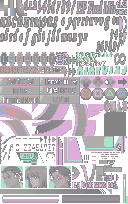
And this is what happens when I ignore all of that and still attempt to replace textures anyway:
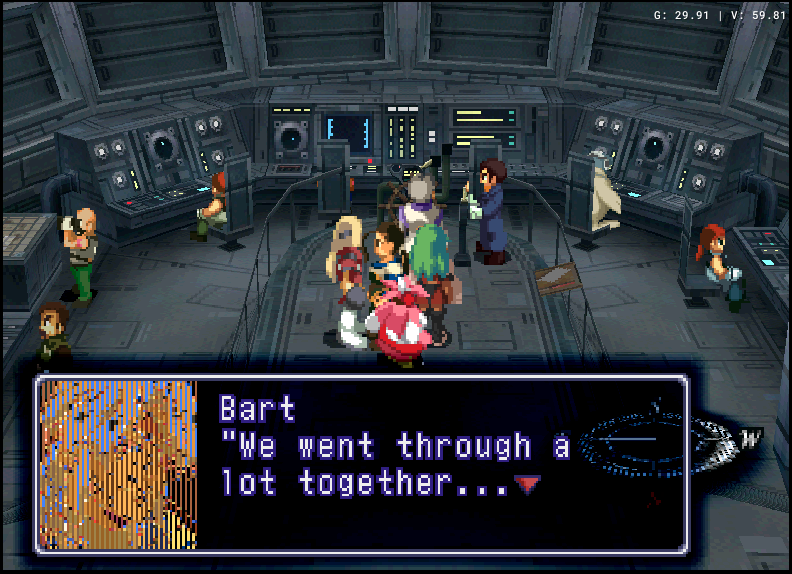
(edit: put this all in a hidden drop down to keep the page from being ridiculously huge)
Thank you so much for taking the time to provide such a thorough answer! I now understand that Duckstation is clearly not ready for texture replacement. I will stick to Retroarch then. Thanks again for your very precious work, I played this game on PSX back in the day on minuscule tv and now thanks to you I can replay it on a big screen, it’s a dream!
No problem!
Oh nice! Been a while since you last played it, huh? If you haven’t heard of it already, I highly recommend playing the Perfect Works Build mod for replays. It’s a really great way to re-experience the gameplay and story. The team has done such a good job of rebalancing the gameplay and retranslating the story. They’ve retranslated everything up to the Mass Driver in disc 2. (ofc, just make sure not to apply the Readjusted Portraits/Graphical Fixes patch as it interferes with this mod)
Well, this looks like a dream come true! Polished graphics, rebalanced gameplay e revised script… you guys are amazing! It will be such a pleasure to replay the game with these features after so many years, especially since back then I barely knew any English hence I skipped most dialogues, nonetheless i fell in love with game! I’ve now set up the game with your work and the perfect work build and I’m ready to start the adventure, but I’ll wait until I’m done with Suikoden 2 - one masterpiece at a time <3
I just registered to say THANK YOU for all your hard work, which made my latest playthrough extra special! Much appreciated
I’m glad to hear it’s being put to good use in someone’s replay! (by someone other than me lol) 
Love what you have done, this was something I had been wanting for a long time. Not sure if you saw, but a bunch of high resolution assets from the game pro magazine were uploaded recently. The xenogears section includes a bunch of portraits, including some that were really tiny in the perfect works like the five gebler officers. Still no bart and sigurd looking to the right unfortunately.
https://archive.gamehistory.org/folder/557b20ea-d58e-4443-b9f8-21f4436ad926
Thanks!
Yeah, I was freaking out about it the day it released lol
Went through all of them that day and uploaded them in place of all of the old versions of portraits on the Xenosaga Wiki.
I was like, welp, I was 5 portraits away from being done, literally just recently thinking of getting that done soon, after hundreds of hours of work into cleaning these up, and suddenly I have way more work to do on it than before, scrapping many portraits I worked on for the higher quality originals, but I couldn’t be happier. We got a full portrait of Id!! Now Karen’s full portrait is the one that’s the most elusive.
Bart looking to the right is the correct orientation of the one that was on that CD—the one you see most everywhere—based on his eyepatch.
Hence why I uploaded it horizontally flipped, but his other art does in fact exist, it’s on page 182 of Perfect Works.
But yeah, we’re missing high quality versions of Bart looking to the left (eyepatch nearest to the viewer, let’s say), Midori, Karen, Gaspar (his was pretty good compared to what we had before, but still weirdly stretched and cropped on that CD), Elly on Drive, Sophia, Nikolai, and then Stein and Gear-fused-Hammer still only exist as sprites, no artwork anywhere.
Then of course, there are high quality portraits on that CD that are still cropped… but we’ll probably never get those full versions unless Tanaka himself released them.


And here’s a .BAT file to rename them all for you.
Rename.bat renames the files.
Revert.bat reverts the files back to their original names.
Just place the .BAT files in the same folder with the textures to be renamed before running.
You’re free to include this with future versions of the mod, if you desire.
One question though: Does this change mean the “Readjusted portraits” and “Graphical fixes” patches from the Perfect Works Build can be used, or do they still need to be omitted?
Oh, cool, thanks! …Though I’m unsure of who would even be using that super old version of PWB anymore. I’d just left that old info in here for comprehensive history’s/version’s sake.
The patches can be used… but things have changed since, like the “Readjusted portraits” and “Graphical fixes” checkboxes being added to the patcher now, so I’m unsure of whether or not this list of file name changes is appropriate for these options any longer in the newest PWB versions. Who knows, things could’ve changed any number of ways since.
As stated before, that list is mainly for PWB 0.4.6 (it’s currently at 0.8.1, way past that), but you can find out if it works for the latest patcher options if you want. If it doesn’t work then you’ll just have to find the new file names via manually dumping them from the game and renaming the mod’s files accordingly.
I wouldn’t say it’s worth the trouble though, if the “Readjusted portraits” checkbox just fixes the stretched portraits and the “Graphical fixes” checkbox just fixes things like the transparent pixels (in portraits like one of older Emeralda’s portraits that only pops up twice in the game, iirc). All of that is fixed via the texture replacing, so I don’t think it’s worth the hassle if you’re planning on using texture replacing anyway.
Just uncheck those boxes when patching and save yourself a lot of time and effort.
`
(Elaborating on that bit about Emeralda for anyone curious; older Em has two dialogue portraits, facing right, as they all do [the ones facing left are menu portraits; and those with the border/background are battle portraits, ofc].
Those portraits of hers are named “bf58561-84598680” and “54cb8504-84598680”. She has 2 identical dialogue portraits because retroarch dumps 2 for her in different places. One that looks fine most everywhere, and the other that has transparent pixels around her fringe/eye that only appears when she asks whether you’re ready to fall down the hole in Merkabah and then again during her dialogue when the party is discussing the Deus pillars. That’s it.)
I’ve been digging around the Perfect Works FAQ, and this page:
https://github.com/NoharOSP/Perfect_Works_Build/wiki/Graphical-Fixes
still lists those exact same 16 texture file name changes. So they should still need to be renamed.
Ah okay, good to know.  Only a “need” if someone checks that one box though, so I don’t know who’d want to give themselves more steps. Best to keep it simple.
The “Readjusted Portraits” patch though, should be avoided either way bc of obvious ratio reasons. I’ll make sure to specify all of this when I get around to rewriting the main post with the next update or w/e.
(Also, the Roni patch, I was reminded of again just earlier, should also be left unchecked as that no doubt changes the file name of another one there separately from the rest. The Roni patch wasn’t a thing back then, v0.4.6. Texture replacement gives you the option of either Roni, so again it also rends that patch unnecessary as well.)
from that page:
“Regardless of whether the portrait mod has been selected, character facesets that previous suffered from rogue pixels have been fixed.”
That page doesn’t list an optional mod, it lists a change that has been made in the base Perfect Works Build.
Basically the texture renames are needed for PWB version 0.4.6 and newer. So even the newest versions need that rename still.
from that page:
“Regardless of whether the portrait mod has been selected, character facesets that previous suffered from rogue pixels have been fixed.”That page doesn’t list an optional mod, it lists a change that has been made in the base Perfect Works Build.
Basically the texture renames are needed for PWB version 0.4.6 and newer. So even the newest versions need that rename still.
No, that quote that you’re referring to is under the “Graphical Fixes” section. It’s literally referring to that patch. Those portraits with “rogue pixels” is what that patch is all about.
Not to mention that page is all about describing optional graphical patches.
Doesn’t matter how that page is specifically worded, this is how it has worked for like 1.5 years since they made that 0.4.6-specific issue into its own separate patches after I told them that that version of the mod breaks texture replacement.
Going into a PWB 0.8.2-patched rom just now (one without any portrait patches selected when patching it) and loading up the scene with Fei and Elly in the forest, the Sad Fei portrait (one of those changed in the Graphical Fixes patch) doesn’t break; they don’t need to be renamed if you don’t use the patches.
So again, don’t check both of those options if you’re planning on playing it with texture replacement.
Because those portraits with “rogue pixels” are non-issues with texture replacement. No need to add extra work in setting it up by having to rename things afterwards.
That quote isn’t saying that “regardless of whether the patches were selected, they’ve been fixed“. It’s referring to what the “Readjusted Portraits” section mentioned above—that the Readjusted Portraits patch also includes those “Graphical fixes“, but regardless of whether that one has been selected, those issues “have been fixed”….““through the inclusion of this separate ‘Graphical fixes’ patch””, and then it goes on to describe said patch.
Badly worded? Yes. Taken in context? Makes a lot more sense.
(edited for better wording and elaborating)(edited again bc formatting broke and i’m a perfectionist)
Forgive my ignorance but are the links down for the downloads?
Hey @MrSafe - Since I am fixing up the website, these were not here originally. Great timing though, because we were just in the middle of fixing this! 
Please press ctrl + F5 on your keyboard to refresh and see the change in the top level thread.
Please lmk if you see them.
edit: also here:
Download
I see them, thank you so much.
1 Like
Will we eventually be able to edit our old migrated posts in the future?